
 exasol-developer-documentation
Data Steward Agent#
Overview#
Learn how to automatically generate and manage column comments in your Exasol database using AI. This tutorial demonstrates a Data Steward Agent that analyzes column names, data types, and sample values to suggest meaningful documentation using local LLMs (Ollama).
Why Automate Metadata Documentation?#
Database metadata is critical for data discovery, governance, and effective data usage. However, many databases lack proper documentation, especially:
Inherited databases from previous teams
Post-migration scenarios where metadata was lost
Rapidly evolving schemas where documentation falls behind
Benefits of AI-Assisted Documentation:
- Time Savings
Automate tedious documentation tasks
Process hundreds of columns in minutes
Focus human effort on review rather than drafting
- Consistency
Uniform comment style across all schemas
Professional, concise descriptions
No more cryptic abbreviations left unexplained
- AI-Ready Data
Rich metadata enables AI-driven analytics
Semantic context for LLM-powered queries
Foundation for natural language data exploration
- Self-Hosted & Secure
Data never leaves your infrastructure
No third-party API calls
Full compliance control
Architecture#
                 ┌─────────────────┐      HTTP Request     ┌─────────────────┐
                 │   Exasol DB     │ ────────────────────> │ Mistral model   │
Column   <─────  │  (UDF + Views)  │      (Python UDF)     │   (Ollama)      │
Comments   SQL   │                 │ <──────────────────── │                 │
                 └─────────────────┘       JSON Response   └─────────────────┘
The agent workflow:
Identify - Query system catalog for columns without comments
Analyze - Gather column metadata and sample values
Generate - Call Ollama to suggest descriptions
Review - Human approval of suggestions
Apply - Write approved comments to database
Prerequisites#
Required:
Exasol database (Docker image works for testing)
Ollama installed locally with Mistral model
Python 3.8+ with pyexasol
Basic SQL knowledge
Ollama Setup:
# Install Ollama (macOS)
brew install ollama

# Start server and download model
ollama serve &
ollama pull mistral
Create Agent Infrastructure#
Create a dedicated schema for the Data Steward Agent with tables to track suggestions and their status.
Schema and Tables#
-- Create DATA_STEWARD schema
CREATE SCHEMA IF NOT EXISTS DATA_STEWARD;

-- SUGGESTIONS table stores LLM-generated column comment suggestions
CREATE TABLE IF NOT EXISTS DATA_STEWARD.SUGGESTIONS (
    ID INTEGER IDENTITY PRIMARY KEY,
    SCHEMA_NAME VARCHAR(128) NOT NULL,
    TABLE_NAME VARCHAR(128) NOT NULL,
    COLUMN_NAME VARCHAR(128) NOT NULL,
    SUGGESTED_COMMENT VARCHAR(2000),
    STATUS VARCHAR(20) DEFAULT 'PENDING',
    CREATED_AT TIMESTAMP DEFAULT CURRENT_TIMESTAMP,
    UPDATED_AT TIMESTAMP DEFAULT CURRENT_TIMESTAMP
);

-- APPLIED_LOG tracks which comments have been applied
CREATE TABLE IF NOT EXISTS DATA_STEWARD.APPLIED_LOG (
    ID INTEGER IDENTITY PRIMARY KEY,
    SUGGESTION_ID INTEGER NOT NULL,
    APPLIED_AT TIMESTAMP DEFAULT CURRENT_TIMESTAMP,
    APPLIED_BY VARCHAR(128) DEFAULT CURRENT_USER,
    SCHEMA_NAME VARCHAR(128),
    TABLE_NAME VARCHAR(128),
    COLUMN_NAME VARCHAR(128),
    COMMENT_TEXT VARCHAR(2000)
);
Views#
-- View to identify columns missing comments
CREATE OR REPLACE VIEW DATA_STEWARD.MISSING_METADATA AS
SELECT
    COLUMN_SCHEMA,
    COLUMN_TABLE,
    COLUMN_NAME,
    COLUMN_TYPE,
    COLUMN_IS_NULLABLE
FROM
    SYS.EXA_ALL_COLUMNS
WHERE
    COLUMN_COMMENT IS NULL
    AND COLUMN_SCHEMA NOT IN ('SYS', 'EXA_STATISTICS', 'DATA_STEWARD')
ORDER BY
    COLUMN_SCHEMA,
    COLUMN_TABLE,
    COLUMN_ORDINAL_POSITION;

-- Helper view: formatted column list per table
CREATE OR REPLACE VIEW DATA_STEWARD.TABLE_COLUMNS_FORMATTED AS
SELECT
    COLUMN_SCHEMA,
    COLUMN_TABLE,
    GROUP_CONCAT(
        COLUMN_NAME || ' (' || COLUMN_TYPE || ')'
        ORDER BY COLUMN_ORDINAL_POSITION
        SEPARATOR ', '
    ) AS COLUMN_LIST
FROM SYS.EXA_ALL_COLUMNS
WHERE COLUMN_SCHEMA NOT IN ('SYS', 'EXA_STATISTICS', 'DATA_STEWARD')
GROUP BY COLUMN_SCHEMA, COLUMN_TABLE;
Ollama Connection#
Store the Ollama endpoint in a connection object for reusability:
-- Replace localhost with your machine's IP if Exasol runs in Docker
CREATE OR REPLACE CONNECTION OLLAMA_API
TO 'http://YOUR_IP:11434/api/generate'
IDENTIFIED BY '';
Note
If Exasol runs in Docker, use your machine’s local IP (e.g., 10.0.0.186)
instead of localhost. Find it with ipconfig getifaddr en0 (macOS)
or hostname -I (Linux).
AI-Powered UDF#
This UDF calls Ollama to generate column comment suggestions based on metadata and sample values.
CREATE OR REPLACE PYTHON3 SCALAR SCRIPT DATA_STEWARD.SUGGEST_COLUMN_COMMENT(
    connection_name VARCHAR(200),
    schema_name VARCHAR(128),
    table_name VARCHAR(128),
    column_name VARCHAR(128),
    data_type VARCHAR(100),
    sample_values VARCHAR(2000),
    table_columns VARCHAR(4000)
)
RETURNS VARCHAR(2000) AS

import requests
import json

def run(ctx):
    try:
        conn_info = exa.get_connection(ctx.connection_name)
        ollama_url = conn_info.address

        prompt = f"""You are a database documentation expert. Generate a concise, informative comment for this database column.

Schema: {ctx.schema_name}
Table: {ctx.table_name}
Column: {ctx.column_name}
Data Type: {ctx.data_type}
Sample Values: {ctx.sample_values if ctx.sample_values else 'No samples'}
Table Columns: {ctx.table_columns if ctx.table_columns else 'Not provided'}

Provide ONLY the comment text (max 200 characters). Be specific, professional, and concise."""

        payload = {
            'model': 'mistral',
            'prompt': prompt,
            'stream': False,
            'options': {'temperature': 0.3, 'num_predict': 100}
        }

        response = requests.post(ollama_url, json=payload, timeout=30)
        response.raise_for_status()

        comment = response.json().get('response', '').strip()
        comment = comment.replace('"', '').replace("'", '').strip()

        return comment[:200] if len(comment) > 200 else comment

    except Exception as e:
        return f"Error: {str(e)[:100]}"
/
Workflow#
Identify Missing Metadata#
Query the view to see which columns need documentation:
-- See columns missing comments
SELECT
    COLUMN_SCHEMA,
    COLUMN_TABLE,
    COLUMN_NAME,
    COLUMN_TYPE
FROM DATA_STEWARD.MISSING_METADATA
WHERE COLUMN_SCHEMA IN ('SALES', 'HR')  -- Your target schemas
LIMIT 20;

-- Count by schema
SELECT
    COLUMN_SCHEMA,
    COUNT(*) as missing_comments
FROM DATA_STEWARD.MISSING_METADATA
GROUP BY COLUMN_SCHEMA
ORDER BY missing_comments DESC;
Generate Suggestions#
Call the UDF to generate comment suggestions for columns. The example below processes columns one at a time to include real sample values:
-- Test the UDF on a single column
SELECT DATA_STEWARD.SUGGEST_COLUMN_COMMENT(
    'OLLAMA_API',
    'SALES',
    'ORDERS',
    'ord_dt',
    'DATE',
    '2024-01-15, 2024-02-20, 2024-03-10',
    'ord_id (INTEGER), cust_id (INTEGER), ord_dt (DATE), tot_amt (DECIMAL)'
);
For batch processing, use Python with pyexasol to fetch sample values dynamically:
import pyexasol

conn = pyexasol.connect(dsn="localhost:8563", user="sys", password="exasol")

# Get columns to process
columns = conn.execute("""
    SELECT m.COLUMN_SCHEMA, m.COLUMN_TABLE, m.COLUMN_NAME,
           m.COLUMN_TYPE, tc.COLUMN_LIST
    FROM DATA_STEWARD.MISSING_METADATA m
    JOIN DATA_STEWARD.TABLE_COLUMNS_FORMATTED tc
      ON m.COLUMN_SCHEMA = tc.COLUMN_SCHEMA
     AND m.COLUMN_TABLE = tc.COLUMN_TABLE
    WHERE m.COLUMN_SCHEMA = 'SALES'
    LIMIT 10
""").fetchall()

for schema, table, column, dtype, col_list in columns:
    # Fetch sample values
    samples = conn.execute(f'''
        SELECT DISTINCT "{column}"
        FROM {schema}.{table}
        WHERE "{column}" IS NOT NULL
        LIMIT 5
    ''').fetchall()
    sample_str = ', '.join([str(s[0]) for s in samples])[:500]

    # Generate and store suggestion
    conn.execute(f"""
        INSERT INTO DATA_STEWARD.SUGGESTIONS
            (SCHEMA_NAME, TABLE_NAME, COLUMN_NAME, SUGGESTED_COMMENT, STATUS)
        SELECT
            '{schema}', '{table}', '{column}',
            DATA_STEWARD.SUGGEST_COLUMN_COMMENT(
                'OLLAMA_API', '{schema}', '{table}', '{column}', '{dtype}',
                '{sample_str.replace("'", "''")}',
                '{col_list.replace("'", "''")[:2000]}'
            ),
            'PENDING'
    """)
    print(f"Generated: {schema}.{table}.{column}")

conn.commit()
Review Suggestions#
Examine the generated suggestions before approving:
SELECT
    ID,
    SCHEMA_NAME,
    TABLE_NAME,
    COLUMN_NAME,
    SUGGESTED_COMMENT,
    STATUS
FROM DATA_STEWARD.SUGGESTIONS
WHERE STATUS = 'PENDING'
ORDER BY SCHEMA_NAME, TABLE_NAME, ID;
Approve Suggestions#
Mark suggestions as approved after review:
-- Approve all pending suggestions
UPDATE DATA_STEWARD.SUGGESTIONS
SET STATUS = 'APPROVED', UPDATED_AT = CURRENT_TIMESTAMP
WHERE STATUS = 'PENDING';

-- Or approve specific suggestions by ID
UPDATE DATA_STEWARD.SUGGESTIONS
SET STATUS = 'APPROVED', UPDATED_AT = CURRENT_TIMESTAMP
WHERE ID IN (1, 2, 3);

-- Reject a suggestion
UPDATE DATA_STEWARD.SUGGESTIONS
SET STATUS = 'REJECTED', UPDATED_AT = CURRENT_TIMESTAMP
WHERE ID = 4;
Apply to Database#
Generate and execute COMMENT statements for approved suggestions:
-- Preview the statements
SELECT
    'COMMENT ON COLUMN ' || SCHEMA_NAME || '.' || TABLE_NAME || '.' ||
    COLUMN_NAME || ' IS ''' || REPLACE(SUGGESTED_COMMENT, '''', '''''') ||
    ''';' as sql_statement
FROM DATA_STEWARD.SUGGESTIONS
WHERE STATUS = 'APPROVED';
Apply using Python:
result = conn.execute("""
    SELECT ID, SCHEMA_NAME, TABLE_NAME, COLUMN_NAME, SUGGESTED_COMMENT
    FROM DATA_STEWARD.SUGGESTIONS
    WHERE STATUS = 'APPROVED'
""").fetchall()

for suggestion_id, schema, table, column, comment in result:
    safe_comment = comment.replace("'", "''")

    # Apply the comment
    conn.execute(f"COMMENT ON COLUMN {schema}.{table}.{column} IS '{safe_comment}'")

    # Log and update status
    conn.execute(f"""
        INSERT INTO DATA_STEWARD.APPLIED_LOG
        (SUGGESTION_ID, SCHEMA_NAME, TABLE_NAME, COLUMN_NAME, COMMENT_TEXT)
        VALUES ({suggestion_id}, '{schema}', '{table}', '{column}', '{safe_comment}')
    """)
    conn.execute(f"""
        UPDATE DATA_STEWARD.SUGGESTIONS
        SET STATUS = 'APPLIED', UPDATED_AT = CURRENT_TIMESTAMP
        WHERE ID = {suggestion_id}
    """)

conn.commit()
Verify Results#
Confirm comments were applied successfully:
-- Check applied comments in system catalog
SELECT
    COLUMN_SCHEMA,
    COLUMN_TABLE,
    COLUMN_NAME,
    COLUMN_COMMENT
FROM SYS.EXA_ALL_COLUMNS
WHERE COLUMN_SCHEMA = 'SALES'
  AND COLUMN_COMMENT IS NOT NULL;

-- View application log
SELECT * FROM DATA_STEWARD.APPLIED_LOG
ORDER BY APPLIED_AT DESC
LIMIT 10;
Web UI with Gradio#
For a more interactive experience, the Data Steward Agent includes a Gradio-based web interface that provides a visual dashboard for managing metadata suggestions.
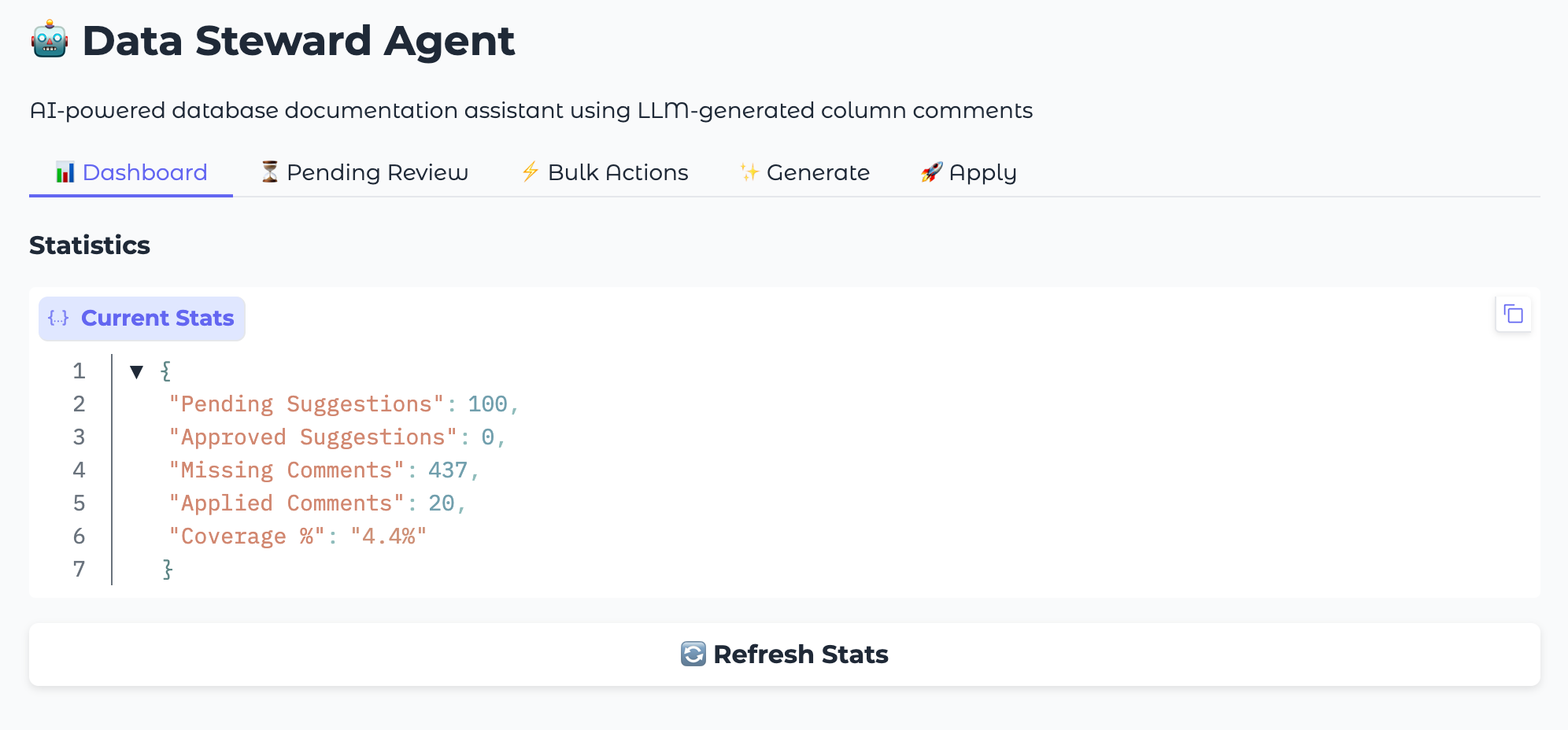
The web UI offers:
- Dashboard Tab
Real-time statistics on documentation coverage
Progress tracking across schemas
Visual indicators for pending, approved, and applied suggestions
- Generate Tab
Select target schemas from a dropdown
One-click suggestion generation
Progress feedback during processing
- Review Tab
Browse pending suggestions in a table view
Approve, reject, or edit individual suggestions
Bulk approve/reject actions for efficiency
- Apply Tab
Preview SQL statements before execution
Apply all approved comments with one click
View application history and logs
Running the Web UI#
# Clone the repository
git clone https://github.com/exasol-labs/metadata-agent.git
cd metadata-agent

# Set up environment
python3 -m venv venv
source venv/bin/activate
pip install -r requirements.txt

# Configure database connection
export EXASOL_DSN="your-host:8563"
export EXASOL_USER="your-user"
export EXASOL_PASSWORD="your-password"

# Start the web interface
python src/app.py
Access the UI at http://localhost:7860
Scheduled Automation#
Run the agent automatically to continuously document new columns.
Workflow Modes#
Mode |
Behavior |
|---|---|
Conservative (default) |
Generate PENDING suggestions, apply previously APPROVED |
Automated |
Generate, auto-approve passing quality checks, apply |
Generate only |
Only generate suggestions for manual review |
Apply only |
Only apply previously approved suggestions |
Cron Setup#
# Add to crontab for daily 2 AM runs
crontab -e

# Add this line
0 2 * * * cd /path/to/metadata-agent && python src/scheduled_run.py >> logs/scheduled.log 2>&1
Resources#
Documentation:
Source Code:
Feedback#
Contact us on the Exasol Community
—
Last updated: January 2026